How AI Chatbots Automate Client Engagement for Agencies
-
11 Feb 2026
-
3156 Views

The Hidden Cost of Slow Replies in Creative Businesses
In the creative industry, speed is currency. Whether you run a boutique design studio or a full-service marketing agency, every potential client’s interest has a shelf life. Research shows that responding within the first five minutes makes you 21 times more likely to qualify a lead than waiting just 30 minutes.
Yet here’s the reality: you’re deep in a campaign build, perfecting a design, or reviewing analytics — and a prospect’s message sits unanswered for hours. By the time you reply, they’ve already booked someone who responded instantly.
That’s where Ainisa comes in — an AI-powered chatbot platform that ensures your creative business stays “always-on,” even when you’re in your deepest flow state.
The “Old Way”: Manual Messaging and Missed Opportunities
Before adopting AI-powered client communication, most creative teams face these daily frustrations:
- The Interruption Cycle: You’re in the middle of a design revision or a campaign strategy session, and a “quick question” from a prospect breaks your concentration. Studies show it takes an average of 23 minutes to regain focus after an interruption.
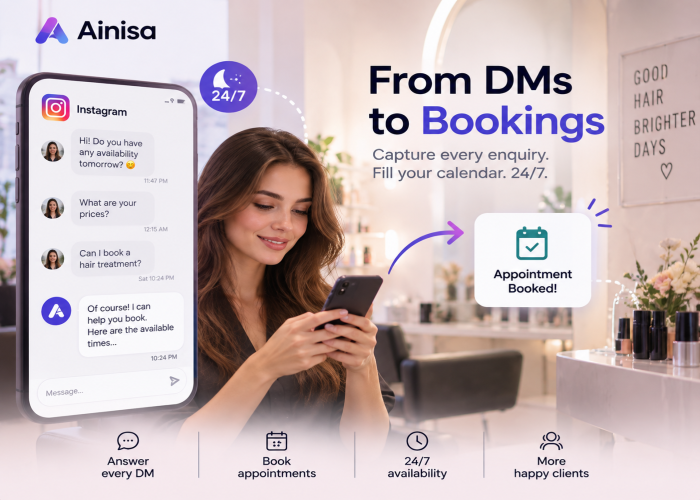
- The 2 AM Lead: A potential client discovers your portfolio at midnight, sends a message full of excitement, and by the time you wake up, they’ve already booked a competitor who responded instantly.
- Manual Data Entry: Hours wasted copying lead information from Instagram DMs, WhatsApp chats, and Messenger threads into your CRM or spreadsheets — instead of doing actual creative work.
- Update Fatigue: Existing clients constantly message asking for “quick updates” on project status, eating away at your billable hours and creative momentum.
The “Ainisa Way”: Your Virtual Studio Manager
Ainisa acts as an intelligent bridge between your creative work and your clients — handling communication logistics so you can focus on delivering exceptional results.
Instant Client Engagement
From the moment a lead says “Hello” on any channel — WhatsApp, Instagram, Facebook Messenger, Telegram, or your website — Ainisa is there. It answers project inquiries, shares your portfolio links, explains your process, and provides pricing information automatically. No more missed first impressions.
Automated Project Updates
Train your Ainisa agent with your project timelines and status information, so it can tell clients things like “We’re currently in the revision phase; expect the next draft by Thursday” — without you lifting a finger. Learn how to set up your agent’s knowledge base in the Ainisa documentation.
Smart Lead Collection & Qualification
Ainisa doesn’t just chat — it works. It asks the right questions (budget, timeline, project type, creative direction) and captures that data so you can review qualified leads when you’re ready. This is where Ainisa truly shines for agencies, offering three powerful methods to collect and route lead data.
24/7 Multichannel Availability
Whether your clients are in a different timezone, browsing your Instagram portfolio at midnight, or sending a WhatsApp message over the weekend — your brand is always responsive, professional, and ready to engage.
3 Powerful Ways to Capture Leads with Ainisa
One of the most common questions agencies ask is: “How do I actually get lead data out of chat conversations and into my workflow?” Ainisa gives you three flexible approaches, each suited to different levels of automation and integration complexity.
Method 1: Conversational Lead Capture (In-Chat Collection)
Best for: Small teams and solo creators who want a simple, zero-integration setup.
With this approach, you simply train your AI agent to naturally ask visitors for their contact details during the conversation. The AI weaves questions about name, email, phone number, and project requirements into the natural flow of dialogue — it never feels like a cold form.
All contact information stays within the chat transcript. You and your team members can access the Ainisa Business Panel at any time, review customer conversations, and extract the contact details directly. It’s the simplest way to start capturing leads without any technical setup.
How it works:
- You instruct your AI agent (via its system prompt) to ask for contact details at the right moment in the conversation.
- The visitor shares their name, email, phone, and project details conversationally.
- Your team reviews the chat transcripts in the Business Panel and follows up manually.
Example AI prompt instruction: “After understanding the visitor’s needs, politely ask for their name, email address, and phone number so our team can prepare a custom proposal.”
Method 2: Lead Form Action (Structured Data + Incentives)
Best for: Agencies that want structured lead data, CRM integration via webhooks, and the ability to offer incentives.
This method takes lead capture to the next level. You create a Lead Form Action in the Ainisa Business Panel, which the AI agent can trigger during conversation. When the moment is right, the AI invites the visitor to fill out a short form — and here’s where it gets powerful.
Key features of Lead Form Actions:
- Custom CTA incentives: Offer a coupon code, a free consultation booking link, a downloadable e-book, a design template, or any other lead magnet as a reward for filling out the form.
- Webhook integration: Automatically send the collected form data to any external system — your CRM (HubSpot, Salesforce, Pipedrive), a Telegram channel for instant team notifications, Google Sheets, Zapier, or any custom endpoint.
- Structured data: Unlike in-chat collection, form responses are cleanly organized with defined fields, making them easy to sort, filter, and import into your sales pipeline.
How it works:
- You create a Lead Form Action in the Ainisa Business Panel with custom fields (name, email, phone, budget, project type, etc.). See the full setup guide in the documentation.
- You configure an optional CTA reward (e.g., “Get 10% off your first project”) and an optional webhook URL.
- You assign this action to your AI agent and instruct it when to trigger the form (e.g., “After qualifying the lead, ask them to fill out the project brief form”).
- During conversation, the AI invites the visitor to complete the form and mentions the incentive.
- Once submitted, the data is saved in Ainisa and simultaneously sent to your webhook (CRM, Telegram, email, etc.).
Example scenario: “I’d love to learn more about your project! Could you fill out this quick brief? As a thank you, you’ll get a link to download our free Social Media Strategy Template.”
Method 3: API Action (Real-Time Automated Data Routing)
Best for: Tech-savvy agencies and businesses that want fully automated, real-time lead routing without any manual steps.
This is the most advanced and seamless method. With an API Action, your AI agent doesn’t need to ask the visitor to fill out a separate form at all. Instead, as the visitor naturally shares their contact details during the conversation, the AI collects the information and automatically sends it to your external systems in real time via API calls.
Key features of API Actions:
- Zero friction: The visitor never leaves the chat or fills out a separate form. Everything happens within the natural conversation flow.
- Real-time delivery: As soon as the AI has the required information, it fires an API call to your CRM, sends a Telegram notification, triggers an email to your sales team, or pushes data to any system with an API endpoint.
- Full customization: Define exactly what data the AI should collect, what endpoint to call, and what payload format to send. You have complete control over the integration.
How it works:
- You create an API Action in the Ainisa Business Panel specifying the endpoint URL, HTTP method, headers, and payload structure. See the API Action documentation for details.
- You assign it to your AI agent and instruct the agent to collect specific fields (name, email, phone, project details) during conversation.
- When the visitor provides their details naturally in chat, the AI recognizes it has all required data and triggers the API Action.
- The data is sent instantly to your CRM, Telegram channel, email service, Google Sheets, or any other connected system — all in real time.
Example scenario: A visitor says “My name is Sarah, email is **** and I need a brand identity package.” The AI confirms the details and silently pushes the data to your HubSpot CRM via API — no form, no friction, no delay.
Which Lead Capture Method Should You Choose?
Here’s a quick comparison to help you decide:
| Feature | In-Chat | Lead Form | API Action |
|---|---|---|---|
| Setup Complexity | None | Low | Medium |
| CRM Integration | Manual | Webhook | Real-time API |
| User Experience | Conversational | Form popup | Seamless |
| Lead Magnet / CTA | No | Yes | Custom |
| Data Structure | Unstructured | Structured | Structured |
| Best For | Solo creators | Growing agencies | Tech-savvy teams |
For detailed setup guides on all three methods, visit the Ainisa documentation.
Key Benefits & ROI for Marketing and Creative Teams
- Higher Conversion Rates: Respond to 100% of leads instantly, significantly increasing the chance of booking the project. With Ainisa’s lead capture methods, no contact data falls through the cracks.
- Protected Deep Work Time: Block out hours for creative execution without worrying about “ignoring” clients. Your AI agent handles the front line.
- Professional Brand Image: Clients experience an organized, tech-forward business that respects their time and provides instant, accurate information across every channel.
- Streamlined Onboarding: Use Lead Form Actions with custom CTAs to collect initial project briefs right inside the chat, eliminating hours of back-and-forth emails.
- Automated CRM Pipeline: With webhook and API integrations, leads flow directly into your sales pipeline — no manual data entry required.
What This Looks Like in Practice
Imagine you run a boutique marketing agency. It’s campaign season, your team is deep in creative work, and your Instagram and WhatsApp are blowing up with inquiries from potential clients. Before Ainisa, you’d either stop what you’re doing to answer every DM or accept that some leads will slip away.
With Ainisa deployed across your channels:
- Every inquiry gets an instant, branded greeting and a link to your Services page — even at 2 AM.
- A Lead Form Action collects project briefs with a free downloadable resource as an incentive, so prospects feel rewarded for sharing their details.
- A webhook sends every new lead directly to your CRM and a dedicated Telegram channel, so your sales team gets notified in real time.
- Your creative team stays in the zone, and you reclaim hours every week that used to go toward “gatekeeping” your inbox.
Response time drops to zero. Lead capture becomes automatic. And your team can finally focus on what they do best — creating exceptional work.
Don’t Let Your Next Big Project Slip Through the Cracks
Whether you’re a solo freelancer or a growing agency, Ainisa gives you the tools to capture every lead, qualify them automatically, and route their data exactly where you need it — all without interrupting your creative flow.
Ready to automate your client communication and reclaim your creative time?
➤ Explore Ainisa for Marketing & Creative Agencies