WhatsApp Business API vs Regular WhatsApp: What Every Business Needs to Know
-
08 May 2026
-
6176 Views
WhatsApp Business API vs Regular WhatsApp: What Every Business Needs to Know
The Question Every Business Asks Eventually
You're using WhatsApp to communicate with customers. It's working. Customers reply, conversations happen, orders come in. Then someone tells you there's a "WhatsApp Business API" and that you should probably be using it.
What's the difference? Is it worth switching? What do you actually get?
These are the questions this post answers — clearly and without the technical jargon that tends to surround this topic.
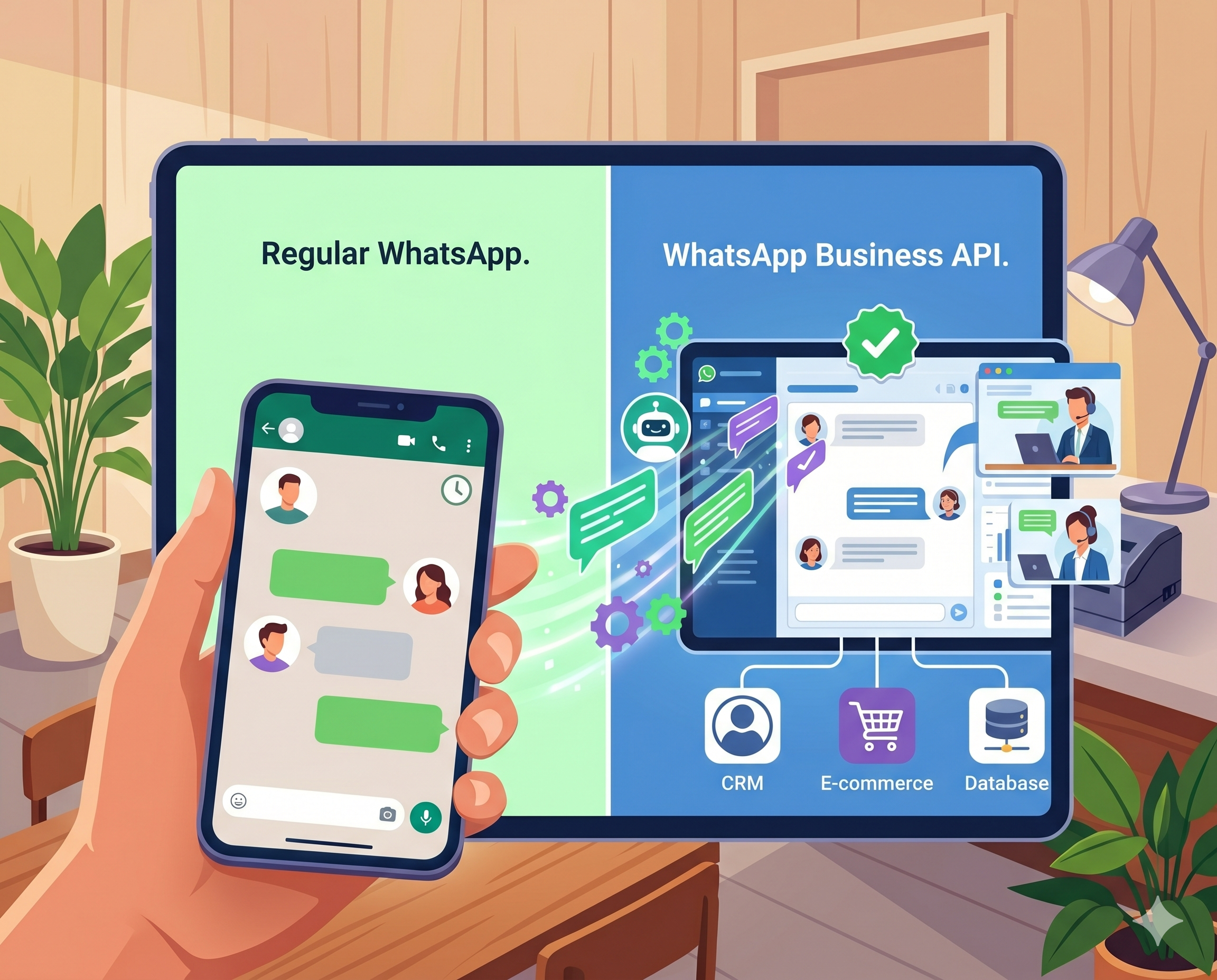
The short version: Regular WhatsApp and even the free WhatsApp Business app have a hard ceiling. The API removes that ceiling and unlocks the capabilities that make WhatsApp genuinely useful at scale — automation, multiple agents, chatbots, integrations, and official platform features that the standard apps simply can't provide.
The Three Versions of WhatsApp
To understand the difference, it helps to know that WhatsApp actually comes in three distinct versions with very different capabilities.
WhatsApp Personal is the app most people have on their phone. It's for personal communication — 1-on-1 messages, group chats, voice and video calls. It has no business features, no multi-device team support, and no automation. Using it for business is technically against WhatsApp's Terms of Service.
WhatsApp Business App is the free app Meta made for small businesses. It adds a business profile, product catalogue, quick replies, away messages, and labels to organise chats. One person manages it from one phone. It's a meaningful upgrade from the personal app for very small operations, but it has the same fundamental limitation: everything is manual, and only one person can use it at a time.
WhatsApp Business API is the official programmatic interface that allows third-party platforms, developers, and businesses to connect to WhatsApp at scale. This is what powers every chatbot, every automated response, every multi-agent inbox, every CRM integration you've seen running on WhatsApp. It is not an app you download — it's an API connection that your business accesses through an official Business Solution Provider (BSP) or platform.
Side-by-Side: What Each Version Can Do
| Feature | Personal | Business App | Business API |
|---|---|---|---|
| Business profile | ❌ | ✅ | ✅ |
| Product catalogue | ❌ | ✅ | ✅ |
| Quick replies | ❌ | ✅ | ✅ |
| Away/greeting messages | ❌ | ✅ | ✅ |
| Multiple users/agents | ❌ | ❌ | ✅ |
| Chatbot / AI automation | ❌ | ❌ | ✅ |
| Bulk broadcast campaigns | ❌ | Limited | ✅ |
| CRM / system integrations | ❌ | ❌ | ✅ |
| Webhook support | ❌ | ❌ | ✅ |
| Green tick verification | ❌ | ❌ | ✅ |
| Official Meta support | ❌ | Limited | ✅ |
| Used via | Phone app | Phone app | Platform/BSP |
What the Business API Actually Unlocks
Multiple Agents on One Number
With the personal app and the Business app, your WhatsApp number is tied to one device and one person. The moment you need two or three people handling customer messages — or a whole support team — the standard apps break down.
The API allows any number of agents to access the same WhatsApp number simultaneously through a shared inbox. One number, one brand, unlimited team members. Conversations can be assigned, labeled, escalated, and tracked. This is the foundation of any real customer support operation on WhatsApp.
Chatbots and AI Automation
This is the big one. The API is what makes WhatsApp chatbots possible.
A bot connected to the API can receive messages, process them, and send responses — automatically, at scale, 24 hours a day. It can answer FAQs from a knowledge base, collect lead information, check order status via an external API, book appointments, qualify prospects, and hand off to a human agent when needed.
None of this is possible with the standard Business App. Away messages and quick replies are the limit of what that app can automate — and they're one-directional, not conversational.
Broadcast Campaigns to Opted-In Contacts
The Business App lets you send bulk messages to saved contacts, but it's limited in scale and increasingly restricted by Meta. The API enables proper broadcast campaigns — sending templated messages to large opted-in contact lists, with tracking, analytics, and compliance built in.
These campaigns require pre-approved message templates and opted-in recipients — Meta takes consent seriously. But within those parameters, they're a powerful marketing and re-engagement channel.
CRM and System Integrations
The API exposes webhooks and endpoints that allow WhatsApp to connect to virtually any external system — CRMs, ERPs, ticketing systems, e-commerce platforms, booking systems, and more.
This is what makes it possible to do things like: automatically create a lead in your CRM when a WhatsApp conversation starts, pull a customer's order history into the chat in real time, update a support ticket when the conversation resolves, or push a WhatsApp message when an order ships.
Without the API, none of these integrations are possible.
Green Tick Verification
The green tick badge on a WhatsApp business profile signals to customers that the account has been officially verified by Meta. It's the WhatsApp equivalent of a blue checkmark. It increases trust — especially important for businesses in high-stakes industries or with large customer bases.
Green tick verification is only available to businesses using the WhatsApp Business API.
The Limitation the Business App Doesn't Advertise
The free WhatsApp Business App has one critical limitation that isn't prominently stated: it's designed for one person on one device.
In practice, this means:
- Only one person can actively manage conversations at any given time
- If the phone is off, conversations go unanswered
- If two people need to access the same number, you're in a grey area with workarounds that violate WhatsApp's Terms
- There's no way to assign conversations, track response times, or report on team performance
- There's no way to connect a bot or any automation beyond basic templates
For a sole proprietor managing a small volume of customer conversations, the Business App is fine. The moment you have a team, meaningful message volume, or any need for automation, it becomes the wrong tool.
What the API Costs
This is where businesses often hesitate, and it's worth being straightforward about the cost structure.
Meta's conversation fees apply to all WhatsApp Business API usage. Meta charges per conversation — not per message — with prices varying by country and conversation type (marketing, utility, authentication, service). These fees are unavoidable; they're charged regardless of which platform you use to access the API.
Platform fees are charged by the BSP or platform you use to connect to the API. Some platforms charge a flat monthly fee. Others add a markup on top of Meta's conversation fees. Some do both. The pricing model matters significantly to your total cost.
AI costs, if you use a chatbot, depend on how the platform handles AI. Most platforms either bundle AI into their pricing (opaque cost, often marked up significantly), or they use a BYOK model where you connect your own OpenAI or Anthropic API key and pay the AI provider directly at their published rates.
For high-volume businesses, the difference between a platform that marks up AI costs and one that uses BYOK can run to hundreds of dollars per month. For a detailed breakdown of how BYOK pricing works and what it means for your total costs, see What Is BYOK and Why It Matters for AI Chatbot Costs.
How to Access the WhatsApp Business API
You access the API through an official Meta Business Solution Provider (BSP) or a platform built on top of the API. Ainisa, WATI, Respond.io, and ManyChat are examples of platforms that provide API access alongside their own interface and features.
The setup process involves:
- Creating a Meta Business Account if you don't already have one
- Verifying your business with Meta — this typically requires business documentation and can take a few days
- Connecting through a BSP or platform — the platform guides you through linking your phone number to the API
- Setting up your profile, templates, and configuration — number, business profile, any message templates you'll need for outreach
Official Meta Technology Partners — like Ainisa — have embedded onboarding that simplifies this process significantly. Setup that used to take weeks now typically takes hours.
One thing to be aware of: you cannot use a number that is currently active on the personal WhatsApp app or the Business App simultaneously on the API. You'll need either a fresh number or to migrate an existing one, which involves confirming you understand the switch.
The Green Tick: What It Is and How to Get It
The green verified badge on a WhatsApp profile signals that Meta has confirmed the account belongs to the business it claims to be. It appears next to your business name in conversations.
To qualify, your business typically needs to:
- Use the WhatsApp Business API (not the standard apps)
- Have a verified Meta Business Account
- Be a recognisably established brand — Meta tends to approve larger or well-known brands more readily, though this is not an absolute requirement
- Submit a verification request through your BSP or directly via Meta's Business Manager
The badge improves trust with customers, particularly in markets where WhatsApp scams are common. It also increases deliverability for broadcast messages. It's worth pursuing once your API setup is stable.
When to Stick with the Business App
Not every business needs the API right now. The free Business App is the right choice if:
- You're a solo operator handling a manageable volume of messages yourself
- You don't need automation — you're happy to respond manually
- You don't need multiple people managing conversations
- You're just getting started and want to validate WhatsApp as a channel before investing in infrastructure
The Business App is a reasonable starting point. The question is what comes next when you outgrow it.
When to Move to the API
The API makes sense — and often pays for itself quickly — when any of these are true:
You have message volume your team can't keep up with. If WhatsApp conversations are being missed, delayed, or are pulling people away from other work, automation is the answer. The API is a prerequisite.
You need more than one person managing the inbox. The moment you want two agents on the same number, you need the API.
You want a chatbot. Whether for FAQ deflection, lead capture, reservation booking, or any other automated flow — chatbots require API access.
You need WhatsApp connected to your other systems. CRM, order management, booking system, helpdesk — any integration requires the API.
You're running marketing broadcasts at scale. Properly managed opt-in campaigns to large contact lists require API access and template approval.
You want the green tick. Verification is API-only.
For a full comparison of the platforms that provide WhatsApp Business API access, see 10 Best WhatsApp Chatbots for Business in 2026.
How Ainisa Handles the API
Ainisa is an official Meta Technology Partner, which means WhatsApp Business API access is built directly into the platform with embedded onboarding. You don't navigate Meta's Business Manager independently — the setup is guided and typically completed in a single session.
Once connected, Ainisa gives you the full stack of API capabilities in one place: a shared team inbox for multiple agents, an AI agent trained on your business knowledge via a hybrid RAG system, API Actions for real-time integrations with external systems, lead capture to Google Sheets or Telegram, human handoff with full conversation context, and broadcast campaign management.
The same agent and knowledge base can be deployed simultaneously across WhatsApp, Instagram, Facebook Messenger, Telegram, TikTok, and your website — so moving to the API doesn't mean building a WhatsApp-only solution. It means building once and deploying everywhere.
On pricing, Ainisa uses a BYOK model — you pay Meta's conversation fees directly (as you would with any API provider) and connect your own AI key for model costs at provider rates. The platform fee is fixed and does not include AI markups. For a direct comparison of this approach against alternatives, see Ainisa vs Chatbase: BYOK vs Credit-Based Pricing Explained and Ainisa vs ManyChat: Which Is Better for Multichannel Automation?.
The Practical Summary
If you're using WhatsApp for business communication and you want it to scale — to handle more volume, to automate repetitive conversations, to connect with your other systems, to have your team work from a shared inbox — the WhatsApp Business API is not optional. It's the infrastructure that makes all of that possible.
The free Business App is a good starting point. It becomes the wrong tool the moment your needs outgrow what one person with one phone can handle.
The API doesn't have to be complicated to set up. With the right platform and an official Meta partner handling onboarding, you can be up and running faster than you'd expect — and the capabilities you unlock are the difference between WhatsApp as a messaging app and WhatsApp as a business channel that genuinely scales.
➤ Try Ainisa Free — No Credit Card Required ➤ Read the Ainisa Documentation ➤ See Ainisa Pricing