WhatsApp Lead Qualification for Consulting Firms: 2026 Setup Guide
-
17 Aug 2026
-
1726 Views
How Consulting Firms Set Up WhatsApp Lead Qualification That Actually Fills the Calendar (2026 Guide)
For most consulting firms, agencies, law firms, and accountants in 2026, WhatsApp is no longer a "nice to have." It's where serious inbound lands — especially from international clients, LatAm, EMEA, and Asian markets, but increasingly everywhere else too. A prospect sees a LinkedIn post on a Sunday night, taps the WhatsApp Business number, sends a voice note describing what she's trying to solve. If nobody answers her in the next thirty minutes with something more than "we'll be in touch," she's already talking to the next firm on Monday morning.
The problem isn't that firms don't want to answer WhatsApp fast — it's that the two things that matter most, qualifying the lead and getting a discovery call on the calendar, are hard to automate well. Generic chatbots treat WhatsApp like a support channel and just collect names and emails. Booking widgets like Calendly put a link in the reply and hope the prospect clicks through. Both leak deals: the first because it dumps unqualified leads into partners' calendars, the second because every extra step (leave the chat, open the link, pick a slot, come back) drops conversion by 20–40%.
The right setup does both jobs inside the same WhatsApp thread: the AI qualifies against real ICP criteria (industry, company size, situation, budget range, timeline), and then — once the prospect passes — books a discovery call directly into the right partner's calendar without her leaving WhatsApp.
This guide walks through exactly how a consulting firm sets this up in 2026: what to define first (ICP, qualification criteria, and calendar routing), how to configure the WhatsApp AI to hold a real qualifying conversation, how to wire booking into Google Calendar or Calendly natively, how to handle the edge cases (existing clients, tire-kickers, cross-language prospects), and what real 90-day results look like.
Who this guide is for
This guide is for professional service firms where:
- WhatsApp is a top-two channel for new client inquiries (typically because prospects find you via LinkedIn posts, referrals, or search)
- The firm bills by project or engagement rather than by unit — so an unqualified discovery call is meaningfully expensive
- There's an ICP that's actually definable (industry, company size, situation, budget) — not "we work with anyone who'll pay us"
- Partners' or senior consultants' time is the bottleneck, not lead volume
If you run a huge enterprise sales team with 15 SDRs answering WhatsApp in under two minutes, this guide is less urgent. Everyone else — read on.
Why WhatsApp + discovery-call automation is the 2026 setup
Three shifts made this a real strategy in 2026, not just a "we should probably try it" line item:
WhatsApp became the serious-inbound channel. By 2026, for firms with any international, LatAm, EMEA, or Asian client footprint, WhatsApp is where deals start. Even domestic-only firms in Europe and North America report that a growing share of inbound from LinkedIn posts and referrals lands on WhatsApp first, not the contact form. If you can't hold a real conversation there, you're losing deals to whoever can.
AI got good enough to actually qualify. Older chatbots couldn't hold a conversation about "what's your current situation with X" — they'd hit a rule they didn't recognize and dump into "someone will contact you shortly." In 2026, modern conversational AI on WhatsApp can genuinely qualify a prospect against your ICP criteria the way an SDR would, using follow-up questions, understanding voice notes, and knowing when to escalate to a human.
Calendar APIs finally work in-thread. Google Calendar and Calendly have proper APIs in 2026. A well-configured WhatsApp AI can check real-time availability, book the slot, add the meeting to the right partner's calendar — all inside the WhatsApp conversation, without the prospect ever leaving. This is the piece that converts.
Firms that set this up well book 40–60% more qualified discovery calls in the first quarter — while cutting partner time on unqualified calls by roughly the same amount. The firms that don't lose the deals to competitors whose WhatsApp answers, qualifies, and books in one conversation.
What "qualifying + booking" actually means in a consulting context
A well-configured WhatsApp AI handles seven concrete jobs:
- Instant response, on brand — every new WhatsApp message gets a warm, on-brand reply within seconds, 24/7 — so the prospect doesn't move on while waiting
- Understand what she's asking — voice notes describing her situation, PDFs of RFPs she attaches, screenshots of dashboards, LinkedIn URLs she pastes. Multi-modal handling matters because prospects don't type long paragraphs in WhatsApp
- Answer service and pricing Q&A — trained on your service descriptions, case studies, and pricing model, answers "what do you do for companies our size?", "do you have experience in fintech?", "what does an engagement typically cost?" with real information (not "someone will contact you")
- Qualify against your ICP — asks the right follow-up questions to establish industry, company size, current situation, budget range, and timeline. Doesn't ask them all at once (which feels like a form) — spreads them across the conversation, natural questions
- Route to the right partner — based on the qualification answers, matches the prospect to the partner or specialist who handles that industry, geography, or service line
- Book the discovery call in-thread — checks the partner's Google Calendar / Calendly availability in real time, offers 2–3 slots, books when the prospect confirms, adds the meeting to the calendar with the full conversation context in the description. If the calendar has a video-conferencing setup already (Google Meet auto-attached to Google Calendar events, for example), the link comes from there — the AI puts the appointment on the calendar, the calendar handles the video link.
- Human handoff when needed — existing clients, sensitive commercial discussions, complex custom scoping, complaints — go straight to a partner or account manager on the same WhatsApp thread
What it does NOT do — and this is where consulting firms often get it wrong:
- Give binding commercial commitments ("we can do this for €X")
- Guarantee outcomes ("we'll deliver Y in Z weeks")
- Debate the price — if the prospect pushes back on cost, that's a human conversation
- Talk about existing clients by name or share confidential engagement details
- Try to close — the goal is a booked, qualified discovery call, not a signed contract
Cross these lines and you either misprice a deal, expose confidential information, or make the firm look pushy. The AI's job is qualifying-and-booking. Closing stays with humans.
What to define before you configure anything
Skip this section and the deployment will fail — the AI has nothing to qualify against or route to. It's a one-day exercise, then reused everywhere else.
Your ICP, written down. Not "we work with growth-stage SaaS companies" — that's a slogan. Actual criteria:
- Industry (list of 3–8 you actually specialize in)
- Company size (revenue range, headcount range, funding stage — whichever fits)
- Situation (pre-launch, post-Series-B scaling, restructuring, M&A prep — what triggers a real need for your service)
- Budget range (what a typical engagement costs — even a "from €X" floor)
- Timeline (immediate need vs. planning for next quarter vs. tire-kicking)
Your qualification questions. Three to six short questions the AI will ask across the conversation, not all at once. Example for a strategy consulting firm:
- "What industry are you in?"
- "Roughly how large is the team you're working with?"
- "What's the current situation you're trying to solve?"
- "Is there a rough timeline you're working toward?"
Don't ask about budget in the first message. Weave it in later, softly ("do you have a rough budget range in mind, or is that still being figured out?") or leave it to the discovery call.
Your routing rules. Which partner or specialist handles which industry, geography, service line, or company size. Even for a small firm this matters — a two-partner firm still routes SaaS to one partner and healthcare to the other.
Your calendar setup. Each partner or specialist has a working Google Calendar or Calendly link with real availability. The AI books into whichever system you use — pick one and stick with it, don't try to mix both.
Your handoff rules. Existing clients (recognized by email or phone number), complaints (any message containing "unhappy", "refund", "complaint"), or complex scoping requests all go straight to a human, in the same WhatsApp thread, with alert to the responsible person.
Once these five things are written down, the actual technical configuration is a few hours of work.
The 5-step setup
Here's the exact sequence a consulting firm follows to launch working WhatsApp lead qualification and discovery-call automation.
Step 1: Connect WhatsApp Business via a Meta Tech Provider platform
You need:
- A verified WhatsApp Business account (or a WhatsApp Business API access via a provider — required for automation; the regular WhatsApp Business app doesn't support it)
- A verified Facebook Business Manager
- A Meta Tech Provider platform (like Ainisa) that handles the WhatsApp Business API integration directly
The regular WhatsApp Business app on a phone doesn't support automation. You need the WhatsApp Business API, and it's accessed through a Meta partner. Meta Tech Provider status matters here: Business Partners (the broader category) typically route you through a longer verification path, while a Meta Tech Provider is on the direct integration path, so connection takes minutes, not the day or two of Meta verification most firms expect.
Practically: 5 minutes for the connection, and you're ready to start configuring.
Step 2: Train the AI on your services and ICP
Upload three documents:
- Service descriptions — what you actually do, how you do it, typical engagement length. Not a marketing brochure — actual descriptions
- Case studies (sanitized) — anonymized examples so the AI can pattern-match ("we've worked with several fintech scale-ups on…")
- Pricing model — even if you don't share numbers publicly, tell the AI the range ("engagements typically run €50–200K over 3–6 months") so it can answer "what does this cost?" honestly without either quoting a number or dodging
Also configure:
- ICP criteria — as a checklist the AI evaluates against (industry, size, situation, budget, timeline)
- Qualification questions — the 3–6 you defined above, with when to ask each
- Routing rules — which partner / specialist handles which combination
The AI indexes the documents into vector embeddings (RAG) so it can pull specific service descriptions or case study details when relevant during a conversation. When a prospect says "we're a Series B fintech in Europe," the AI can reference the relevant case study and route to the fintech partner in one move.
Common mistakes at this step:
- Uploading marketing brochures instead of real service descriptions — the AI ends up sounding like a sales page, not a consultant
- Skipping the ICP criteria — the AI qualifies everyone as "sounds good, let's book a call," which defeats the purpose
- Not defining routing — every lead routes to the founder, who's the bottleneck you were trying to fix
Step 3: Wire the AI to the calendar (Google Calendar or Calendly)
This is the piece that converts. The AI needs real-time calendar access — not "here's a link, please book," but actually checking availability and booking in-thread.
Pick one system and stick with it. Both work well in 2026:
Google Calendar (via native API): cheapest, most flexible. The AI reads each partner's calendar directly, finds slots that match your rules (business hours, buffer time, meeting length), offers 2–3 to the prospect, and creates the event when confirmed. If you've set up Google Meet auto-attach on your calendar (a one-time Google Calendar setting), every event gets a Meet link automatically — the AI puts the appointment on the calendar, Google handles the video link.
Calendly (via API): if your firm is already standardized on Calendly for booking, use it. The AI queries Calendly for available slots per partner's event type, books through the API, and Calendly sends the confirmations and handles the video-conferencing link based on your Calendly event settings. Slightly more expensive than raw Google Calendar but zero disruption if you already use it.
Whatever you pick:
- The AI must check real-time availability, not stale cached data — otherwise it'll book slots that no longer exist
- Buffer time and meeting length must be configurable per partner — some partners do 30-minute discovery calls, others 45
- The meeting invite must include the full conversation context in the description or a linked note, so the partner has actual context, not just a name
- Video-conferencing links come from the calendar's own setup (Google Meet auto-attach in Google Calendar; the video setting in each Calendly event type) — not from the AI. Configure this once when you set up the calendar, and every booked call gets a link automatically.
If your booking currently goes through a form that then emails somebody who then sends a Calendly link, kill that entire chain. It's leaking 40–60% of your inbound.
Step 4: Configure the conversation flow (qualification + booking in one thread)
This is where the AI actually does the work. The flow, roughly:
-
Greet warmly, ask what she's looking for. "Hey! Thanks for reaching out. What are you working on?" — one question, no menu, no options list. Let her tell you.
-
Answer her question, then ask a qualifying question. She says "we're a fintech in France thinking about restructuring our compliance stack." The AI acknowledges, references the case study, and follows up: "That's an area we've worked in — a few of our recent projects have been with French neobanks. Roughly how large is your team?"
-
Keep the qualification natural, over 3–5 exchanges. Not a form. Weave the questions into the conversation. Sector, size, situation, timeline. Budget can wait for the discovery call unless she raises it.
-
When she passes the ICP check, offer the booking. "This sounds like a great fit — [Partner name] handles our fintech work in EMEA. She has 3 slots this week: Thursday 2pm, Friday 10am, or Monday 4pm CET. Which works?"
-
Book in-thread and confirm. She picks Thursday 2pm. The AI books it and confirms: "Booked. You'll get a calendar invite in a moment (with the video link, if that's set up on the calendar). See you Thursday."
-
If she doesn't pass the ICP check, offer the right alternative. Not "we can't help you" — that burns goodwill. Something like "I don't think we're the best fit for a €5K project specifically — we typically work on larger engagements — but I'd recommend [alternative]. Happy to intro if useful?"
-
If she asks something the AI shouldn't answer (pricing negotiation, sensitive commercial terms, existing-client questions), hand off to a partner in-thread with alert.
Configure this at the flow level, not as separate scripts for each intent. The AI holds the whole conversation, using its knowledge base and rules — you're not scripting each turn.
Step 5: Test the whole flow before going live
The biggest launch failure in consulting: shipping a bot that qualifies well in text but breaks on voice notes, or that books successfully but sends the wrong partner, or that hits a language switch and falls apart.
Scenarios to test:
Qualification:
- A perfect-fit lead ("Series B fintech in Berlin, 40 people, restructuring compliance, planning Q3 kickoff") — does the AI recognize it and route to the right partner?
- A borderline lead ("small startup, 5 people, need advice on strategy, tight budget") — does the AI politely acknowledge the mismatch without being dismissive?
- A wrong-industry lead (retail chain when you're B2B SaaS) — does the AI decline cleanly and suggest an alternative?
Booking:
- Real-time availability check across 2–3 partners' calendars
- Booking with buffer time (does it avoid back-to-back meetings?)
- Booking a slot, then cancelling — does the calendar update?
- Timezone handling (prospect in CET, partner in EST) — does the invite show the right times to each?
Multi-modal:
- Voice note describing a situation (does the AI transcribe correctly and respond to content?)
- Attached PDF (RFP or brief) — does it extract the key info?
- Screenshot of a dashboard (does it understand what's shown?)
Safety and edge cases:
- Existing client asking about their engagement — does it recognize and hand off to their account partner?
- Complaint or refund request — does it hand off to a human without trying to handle it?
- Someone asking for a specific price commitment — does it decline and route to a partner?
Multilingual:
- Prospect switches language mid-conversation (does the AI follow?)
- Voice note in a second language (does it transcribe correctly?)
Only launch after every scenario passes. This is a one- or two-day test.
Real example: a boutique strategy consulting firm in EMEA over 90 days
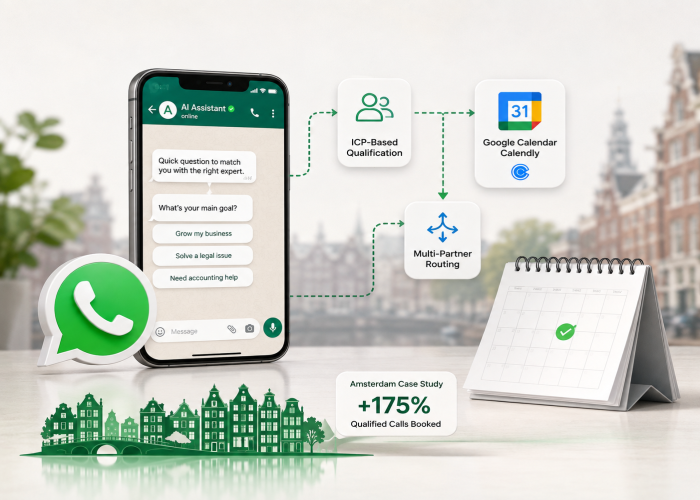
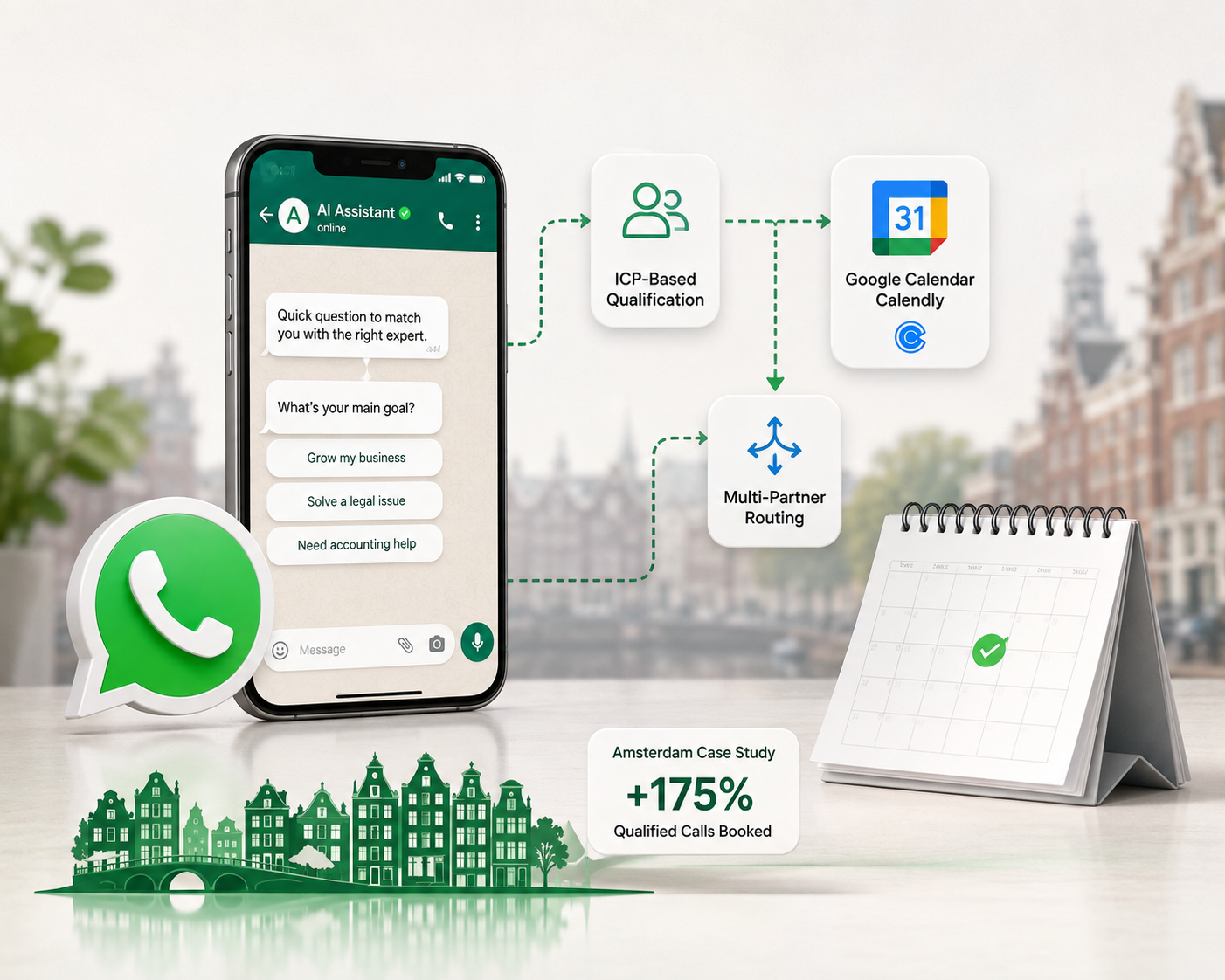
A 12-person boutique strategy firm in Amsterdam serving fintech and healthtech deployed WhatsApp lead qualification + discovery-call automation in early 2026. Setup covered ICP qualification against 5 criteria, routing across 4 partners (fintech EMEA, healthtech EMEA, fintech LatAm, healthtech LatAm), booking directly into each partner's Google Calendar, and multi-modal handling in English, Dutch, Spanish, and Portuguese. What changed in 90 days:
- Response time to WhatsApp inbound went from an average of 3.5 hours (mostly overnight and weekend backlog) to under 30 seconds
- Qualified discovery calls booked per week went from 4 to 11 — a 175% increase, without any change in top-of-funnel activity
- Partner time spent on unqualified calls dropped roughly 70% — the AI now filters out the "we're a 3-person pre-seed startup" and "just curious what you do" conversations before they reach a calendar
- Conversion from qualified discovery call to signed engagement actually rose from 22% to 34% — partners were getting better-context, better-prepared calls, because the conversation history came with the meeting invite
- After-hours bookings (10pm–8am local time) went from 0 to about 6 per week — international prospects who would otherwise have moved on
- Voice notes and PDFs made up 38% of all new inbound — the multi-modal handling captured all of them
- Cross-language prospects (mostly Portuguese and Spanish from LatAm) went from a "we'll figure it out" workaround to a normal booking flow
Total monthly cost stayed under €200 including Meta fees and calendar integrations. The two saved partner-days per week alone paid it back many times over.
5 common mistakes that kill this setup
Firms that don't get value from WhatsApp qualification + booking automation almost always fall into one of these.
1. Skipping the ICP definition. Without written qualification criteria, the AI "qualifies" everyone with "sounds interesting, let's book a call." Then partners spend their week on unqualified discovery calls, get frustrated, and turn off the bot. Write the ICP down before you touch the platform.
2. Making the AI sound like a sales page. Reading marketing brochure copy back to a prospect is instant credibility loss in consulting. The AI's tone has to match how a partner actually talks — direct, curious, professional. Read the first three replies out loud. If they sound like a landing page, rewrite.
3. Using a booking-link handoff instead of in-thread booking. "Great! Here's my Calendly, book a time that works" drops 40–60% of the conversion. The prospect has to leave WhatsApp, open a link, remember your name, pick a slot. Half don't. In-thread booking captures them while they're already in the conversation.
4. Not routing. Everything to the founder or managing partner. That partner becomes the bottleneck the automation was supposed to eliminate. Even a two-person firm should route — industry, geography, service line, whatever's relevant.
5. Not testing multi-modal. The bot works fine on typed English text, then a Portuguese-speaking prospect sends a 90-second voice note describing a complicated restructuring situation, and the bot replies with "sorry, I didn't get that." Test voice notes, PDFs, and language switching before you go live — most competing platforms silently drop these.
What to look for in a platform for consulting WhatsApp automation
Not every chatbot platform handles this well. When evaluating, verify:
- Native WhatsApp Business API via a Meta Tech Provider (not just a Business Partner reseller, and not a scraper). Tech Provider status means faster connection and a more direct integration path
- Multi-modal understanding — voice notes, PDFs, images, videos — up to at least 5 minutes for voice and 60 seconds for video, in multiple languages, so cross-border consulting inbound actually works
- Real-time calendar integration — native to Google Calendar and Calendly (not through Zapier), with in-thread booking, not link handoff
- Configurable qualification logic — ICP criteria as evaluable fields, routing rules by industry / geography / service line, per-partner calendar routing
- CRM handoff — pushes qualified leads to HubSpot, Salesforce, Pipedrive, or your CRM with the full conversation context
- Multilingual support — at least 6 languages natively in the UI, with the AI itself conversing in many more, so a prospect in São Paulo doesn't get a broken English fallback
- UK GDPR / EU GDPR-ready data handling with UK or EU data residency options
- Human handoff inside the same WhatsApp thread, not a separate dashboard
- Live demo you can chat with — send it a voice note, a fake RFP PDF, a language switch mid-conversation, and see how it handles all of it
- BYOK (Bring Your Own Key) or balance top-up — so you have flexibility on how AI costs are billed, especially critical for firms with high inbound volume
Frequently asked questions
Do I need the WhatsApp Business API, or is the WhatsApp Business app enough?
You need the WhatsApp Business API. The WhatsApp Business app on a phone doesn't support automation — no bot, no calendar integration, no CRM handoff. The API is accessed through a Meta partner (a Business Partner or, better, a Meta Tech Provider), which handles the setup and hosts the connection.
Can the AI actually book a call in-thread, or does it just send a Calendly link?
Both are possible, but the difference in conversion is huge. In-thread booking (the AI checks real-time availability, offers slots, and books directly) can capture 60–80% of qualified prospects. Handing off a Calendly link drops that to 25–40% — the prospect has to leave the conversation, and most don't come back. Modern platforms on the WhatsApp Business API can genuinely book in-thread — pick one that does. If your calendar has Google Meet auto-attach or a Calendly video-link setting, the video link is added to the invite automatically; the AI handles the slot, the calendar handles the link.
How does it handle a prospect who doesn't fit the ICP?
Configure the AI to decline politely and, when possible, suggest an alternative. Not "we can't help you" — something like "This sounds like it might be a better fit for a firm that specializes in early-stage — happy to make an intro to [alternative] if useful." Burns no goodwill, and often the prospect refers other work later.
Won't prospects be annoyed that a bot is talking to them on WhatsApp?
Not if the bot is honest about what it is and holds a real conversation. What annoys prospects is a bot that pretends to be human, or that hits a rule and dumps into "someone will contact you shortly." An AI agent that says "I'm here to help you find the right partner and book a call — here are a few quick questions" and then does exactly that is fine. Test it on your own team first — if they cringe, so will prospects.
How does it handle voice notes explaining complex situations?
Modern multi-modal platforms transcribe voice notes (up to 5 minutes on the leading platforms) and understand the content, not just the words. A prospect sending a 3-minute voice note explaining that she's the CFO of a Series B fintech looking at compliance restructuring gets a substantive response referencing the case study you have on that exact situation. Text-only platforms fall back to "sorry, please type" — which loses the deal.
Can it hand off to a specific partner based on the qualification?
Yes — this is one of the most valuable features for consulting. Configure routing rules by industry, geography, service line, or company size, and the AI picks the right partner's calendar to book into. A fintech lead in EMEA goes to the fintech-EMEA partner; a healthtech lead in LatAm goes to the healthtech-LatAm partner. The prospect never knows there was routing logic — she just sees "great, [Partner] handles our fintech work — here are her available slots."
How does it handle existing clients who message the WhatsApp number?
Configure it to recognize existing clients by email or phone number (matched against your CRM) and hand off directly to their account partner, without qualifying them again. Existing clients being asked "so what industry are you in?" is a fast way to lose them.
Does it work in languages other than English?
Yes — but the depth varies by platform. Ainisa, for example, has 8 UI languages and the AI itself converses in many more, so a prospect in Portuguese, Spanish, French, German, or any of dozens of other languages gets a native-feeling conversation, including mid-conversation language switches. For firms with international client bases, this is not optional.
How much does WhatsApp qualification + booking automation cost?
Three components. First, the Meta side (WhatsApp Business API charges per conversation) — for a mid-sized consulting firm this is typically €30–100 per month. Second, the platform fee (the AI layer) — usually €50–200 per month depending on volume and features. Third, AI processing — this is where BYOK matters: with your own API keys, you pay only the actual AI cost, which for a mid-sized firm runs €30–80 per month; or you can use a simple balance top-up if you don't want to manage your own key. Total: usually under €300 per month for a firm with meaningful inbound volume — which pays back in the first saved unqualified partner call.
What if a prospect wants to talk to a real person immediately?
Configure a clear handoff trigger — "human", "person", "partner". When triggered, the AI pauses replies and alerts your team on Slack, Teams, or email. The prospect and the human continue in the same WhatsApp thread — the prospect doesn't have to explain her situation again, because the conversation history is right there.
How long does it take to launch?
With a Meta Tech Provider platform: 5 minutes to connect WhatsApp, 3–4 hours to train the AI on services and ICP, 1–2 hours to wire up the calendar integration, 2–3 hours to configure qualification and routing rules, and 1 day of testing across scenarios and languages. Total: one working week for a solid launch, or one working day if you rush it (not recommended for high-value inbound).
See it before you decide
Reading a guide only gets you so far. Actually messaging a live agent — including sending a voice note, a fake RFP, and booking a discovery call in-thread — tells you in 5 minutes whether it fits your firm.
Ainisa's Consulting & Professional Services AI Agent is live right now — WhatsApp it a lead-qualification scenario, send a voice note describing a client situation, share a PDF, book a discovery call directly in the conversation, or switch language mid-thread. Every qualified lead lands in a public Google Sheet you can open directly to see exactly what your team would receive. Test the same brain that would run in your firm's WhatsApp — without connecting your own account.
8 supported UI languages, AI converses in many more · Voice notes up to 5 min · Videos up to 60 sec · WhatsApp (Meta Tech Provider) + website + Instagram + Facebook + TikTok + Telegram · Google Calendar + Calendly native · Meta Tech Provider · UK GDPR · BYOK or balance top-up · No credit card for trial
More on the same topic:
- 8 Best AI Chatbots for Consulting & Professional Services in 2026 — Comparison Guide — head-to-head comparison of the 8 platforms consulting firms evaluate for this exact use case
- How to Set Up a WhatsApp Chatbot for Your Business in 2026 (Step-by-Step) — the general WhatsApp setup foundation
- 8 Best AI Chatbots for Beauty Salons & Spas in 2026 — parallel comparison in an adjacent service vertical
- How Beauty Salons Set Up Instagram DM Automation That Actually Books Clients (2026 Guide) — Instagram booking patterns that also apply to coaches and personal-brand consultants
- WhatsApp Chatbot for Dental Clinics: 2026 Setup Guide — similar setup pattern in a booking-heavy service vertical
- 8 Best AI Chatbots for Dental Clinics in 2026 — Comparison Guide
- WhatsApp Chatbot for Medical Clinics: Complete Setup Guide 2026
- 8 Best AI Appointment Booking Chatbots for Medical Clinics in 2026
Ainisa also powers AI agents for adjacent verticals:
- 🩺 Medical Clinics — appointments, patient intake, procedure Q&A
- 🦷 Dental Clinics — bookings, insurance intake, patient media handling
- 💇 Beauty Salons & Spas — bookings, service menu, price list
- 🍽️ Restaurants — reservations, menu Q&A, food orders
- 🎓 Education Centers & Academies — enrollment, course info, student support