WhatsApp Chatbot for Restaurants: 2026 Setup Guide
-
02 Jul 2026
-
1852 Views
How Restaurants Use WhatsApp Chatbots for Orders and Reservations (2026 Guide)
The restaurant industry loses an estimated $75 billion each year to missed reservations, unanswered messages, and abandoned orders. In 2026, a growing share of that leakage happens on WhatsApp — the channel where 87% of guests actually message restaurants first. If your team can't answer WhatsApp fast enough, you lose the booking to the restaurant next door.
WhatsApp chatbots have quietly become the single highest-ROI tool for restaurant operators this year. Setup takes an afternoon, monthly cost starts under $40, and a properly configured bot can capture reservations at 11pm on Saturday when your team is deep in service.
This guide walks through exactly how restaurants deploy WhatsApp chatbots in 2026 — from Business API onboarding to menu training to reservation flow to real cost calculations. By the end, you'll know what to build, what it costs, and what to skip.
Why WhatsApp is the Real Reservation Channel in 2026
Instagram gets the marketing attention. Google Reserve gets the SEO credit. But WhatsApp does the actual booking work.
Three shifts made this happen:
Guests moved off phone calls. Under-40 diners rarely call anymore. A 2025 industry survey found 71% of restaurant reservation intents now start as a text or DM. The phone is a fallback, not a first choice.
WhatsApp Business API matured. Meta's Business API used to require Twilio, ISVs, and a $500/month minimum. In 2026 you can onboard through a Meta Business Partner (like Ainisa or Chatfuel) in 1–3 days for under $50/month total.
AI got good enough for menus. Two years ago, an AI chatbot answering menu questions hallucinated 20–30% of the time — dangerous for allergen questions. In 2026, hybrid RAG systems (retrieval-augmented generation) hit 91–95% accuracy when trained on a real menu PDF.
The combination means a small restaurant can now run a 24/7 reservation and ordering system on WhatsApp with less setup than installing a POS.
What a WhatsApp Chatbot Actually Does for a Restaurant
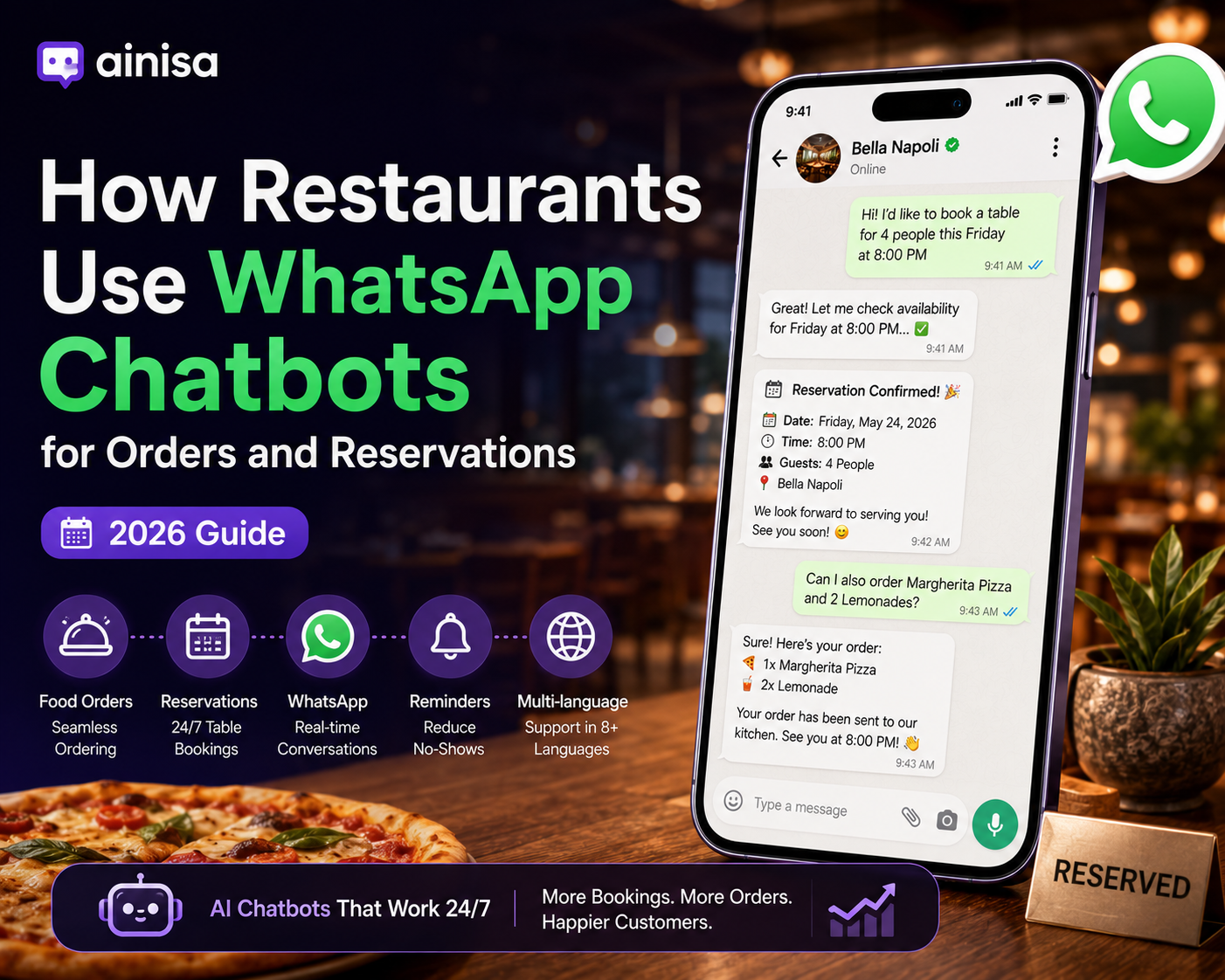
A modern restaurant chatbot handles seven concrete tasks:
- Menu Q&A — Vegetarian, vegan, gluten-free, allergen, and pricing questions from a menu PDF you upload
- Table reservations — Party size, date, time, phone number, special requests — pushed to your calendar or Google Sheet
- Food ordering — Menu browsing, item selection, quantity, notes, and delivery/pickup preference, with orders sent to a Telegram group or email your team already watches
- Reservation reminders — Automated 24h and 2h WhatsApp reminders to reduce no-shows by 25–40%
- FAQ handling — Hours, address, parking, dress code, private events, kids policy
- Staff handoff — When a guest asks something the bot can't answer, it forwards to a human agent inside the same chat
- Multilingual support — Auto-detects the guest's language and replies in kind, critical for tourist-heavy areas
What it doesn't do: replace your host stand, take deposit payments (yet — this is coming in 2026 with WhatsApp Pay expansion), or handle complex dietary consultations.
The 5-Step Setup Process
Here's the exact sequence that most restaurants follow to launch a working WhatsApp chatbot in a single afternoon.
Step 1: Get WhatsApp Business API Access
The regular WhatsApp Business App won't work — it's designed for a human replying manually from a phone. You need the Business API, which requires a Meta Business Partner to onboard you.
What you need:
- A verified Facebook Business Manager account
- A dedicated phone number (not tied to a personal WhatsApp)
- Restaurant business registration documents
- 1–3 business days for Meta's verification
What to expect:
- Message template approval takes 24–48 hours for each template
- The green verified badge is optional and takes 2–4 weeks
- Meta charges per conversation, not per message ($0.005–$0.08 depending on country and type)
Meta Business Partners like Ainisa and Chatfuel handle this onboarding as part of their platform. You don't file anything with Meta directly.
Step 2: Train the AI on Your Menu
Upload your menu as a PDF. The chatbot's RAG system indexes it into vector embeddings so the AI can retrieve exact answers at conversation time.
Do this well:
- Use a clean, structured menu PDF — not a design-heavy image
- Include prices, allergen info, and dish descriptions
- If you have multiple menus (lunch, dinner, weekend), upload each separately
- For multilingual restaurants, upload one version per language
Common mistakes:
- Uploading only images of menus (OCR is unreliable for pricing)
- Skipping allergen and ingredient info (this is where legal risk lives)
- Not updating when the menu changes (a 3-month-old menu produces hallucinations)
A good chatbot platform will show you a confidence score after training. Aim for 90%+ before going live.
Step 3: Connect Your Reservation and Order Flow
This is where restaurants over-engineer and lose weeks. Start simple.
Simplest working setup (recommended for launch):
- Reservations → Google Sheet (one row per booking, with all fields)
- Orders → Telegram group your team already checks (or email)
- Reminders → Automated via chatbot platform's scheduler
This costs $0 in integrations and works for 90% of restaurants. You can upgrade to POS or CRM integration later once you have booking volume that justifies it.
When to add more integration:
- 30+ reservations/day → integrate with Google Calendar or a booking tool
- 20+ orders/day → integrate with your POS (Square, Toast, Lightspeed)
- Multi-location → integrate with your central CRM
Reservation fields to capture (in this order):
- Party size
- Date
- Time
- Guest name
- Phone number (auto-filled from WhatsApp)
- Special requests (allergies, high chair, birthday, window seat)
That's it. Don't ask for email or credit card at reservation stage — it kills conversion.
Step 4: Set Up Reminders and Anti-No-Show Logic
No-show reduction is the single biggest ROI driver of a restaurant chatbot. A typical restaurant loses 12–18% of reservations to no-shows. Reminders drop that to 5–8%.
Two-step reminder cadence that works:
- 24 hours before: "Hi [name], reminder that your reservation for [party size] is tomorrow at [time]. Reply CONFIRM to keep it, or CHANGE to modify."
- 2 hours before: "Hi [name], see you at [time] today! Running late? Reply LATE and we'll hold your table 15 minutes."
The 2-hour reminder converts abandoned reservations into calls to change the time — a save that would otherwise become an empty table.
Rules of thumb:
- Don't send reminders more than twice — it feels spammy
- Include your address as a Google Maps link
- Give a real "cancel" option — trying to prevent cancellation increases no-shows
- For high-value reservations (10+ people), have a human confirm the day before
Step 5: Test in Multiple Languages, Then Go Live
The single biggest launch mistake: testing only in English.
Test scenarios that catch real bugs:
- Menu question in each language you support ("do you have vegetarian options?")
- Reservation in each language with international phone format
- A guest who switches language mid-conversation
- A menu question the bot cannot answer (does it hand off gracefully?)
- An order with special requests ("no onions, extra sauce")
- A vague message like "hi" (does the bot greet warmly, not robotically?)
For tourist-heavy locations, test the top 4–5 tourist languages minimum. In Baku that means English, Russian, Turkish, and Arabic. In Barcelona: English, French, German, and Chinese. Use the target language of the guests actually walking through your door.
Once your language tests pass, publish the WhatsApp number on your Google Business Profile, Instagram bio, website header, and printed table QR codes. This is where most of your inbound traffic will come from.
Real Cost Breakdown for a Restaurant with 500 Conversations/Month
Restaurants over-budget the chatbot and under-budget the WhatsApp fees. Here's what a typical single-location restaurant actually pays:
| Cost | Monthly |
|---|---|
| Chatbot platform (Ainisa Pro annual, or equivalent) | $25 |
| Meta WhatsApp conversation fees (500 service convos @ ~$0.02) | $10 |
| BYOK: your own OpenAI/Anthropic key for 500 convos | $8 |
| Total realistic monthly cost | ~$43 |
At 500 conversations, you're looking at $43/month all-in with a BYOK platform. Platforms that mark up AI usage (Chatfuel, Tidio, Chatbase) will run $80–150/month for the same volume.
Break-even math:
- A single saved reservation for 2 people at $40/person = $80 in revenue
- One saved no-show per week covers the entire monthly cost
- One captured after-hours reservation per week doubles the ROI
The math works fast. Most restaurants recoup their setup cost in the first weekend.
Real Example: A Baku Restaurant's First 90 Days
A mid-sized restaurant in Baku with 60 tables deployed a WhatsApp chatbot in early 2026. Here's what changed in 90 days:
- Reservations captured via WhatsApp grew from 0 to 34% of total bookings
- No-shows dropped from 14% to 6% with automated reminders
- After-hours reservations (10pm-8am) went from 3 per week to 41 per week
- Time saved by front-of-house team answering messages: roughly 12 hours per week
- Multilingual bookings (Russian, English, Turkish, Arabic) reached 22% of all reservations
Total monthly cost stayed under $50 including Meta fees. The bot paid for itself in the first 10 days.
5 Common Mistakes That Kill Restaurant Chatbot ROI
Restaurants that don't get value from their chatbot almost always fall into one of these traps.
1. Trying to build it themselves. Restaurants without a technical co-founder waste months. Use a Meta Business Partner platform with a pre-built restaurant template.
2. Skipping the reminder flow. No-show reduction is where the biggest wins are. If you only automate greetings and skip reminders, you're leaving 70% of the value on the table.
3. Not putting the WhatsApp link everywhere. The bot only works if guests know about it. Your Google Business Profile, Instagram bio, website, table QR codes, and printed menus all need the WhatsApp click-to-chat link.
4. Ignoring the multilingual angle. Every tourist you serve in a language they're not comfortable with is a lost lifetime customer. Even basic 4-language support pays for itself.
5. Forgetting to update the menu. A chatbot trained on last spring's menu will confidently recommend dishes you no longer serve. Re-train it monthly, or every time you change the menu.
What to Look for in a Restaurant Chatbot Platform
Not all chatbot platforms are built for restaurants. When evaluating, check:
- Native WhatsApp Business API (not just Business App or Zapier bridge)
- Meta Business Partner status for smoother onboarding
- Pre-built restaurant template with menu Q&A, reservations, and orders configured
- Multilingual support for at least 6 languages
- BYOK (Bring Your Own Key) so you don't pay AI markup
- Reservation and order delivery to Google Sheets, Telegram, email, or webhook
- Reminder scheduling built in
- Free trial or live demo you can actually chat with before signing up
Frequently Asked Questions
Do I need a separate phone number for the WhatsApp chatbot?
Yes. The number connected to WhatsApp Business API can't be used with the regular WhatsApp or WhatsApp Business App at the same time. Most restaurants dedicate a new number or a virtual number to the API and print it on their booking materials.
Can the chatbot take payment for reservation deposits?
Not natively in most countries yet. WhatsApp Pay is expanding through 2026 but coverage is uneven. For now, restaurants that require deposits send a payment link (Stripe, PayPal) inside the chat — the guest completes payment in a browser tab and the bot confirms the reservation.
How do I handle a guest who wants to speak to a human?
Every restaurant chatbot should have a "human handoff" trigger — usually the word "manager," "human," or "help." When triggered, the bot notifies your team and pauses AI replies in that conversation until a human responds. Look for platforms where handoff happens inside the same WhatsApp chat, not on a separate dashboard.
Will the chatbot answer questions incorrectly?
Modern RAG-based chatbots hit 91–95% accuracy on menu questions when trained on clean data. For the remaining 5–9%, a well-configured bot will say "let me check with the team" instead of hallucinating. Never accept a platform without a "don't know" fallback.
Do WhatsApp chatbots work for delivery-only restaurants?
Yes, and especially well. Delivery guests place repeat orders, so the bot can remember preferences and recommend based on history. A delivery-only restaurant sees the highest chatbot ROI because every conversation is a potential order, not just a question.
What happens if my chatbot breaks during service?
Choose a platform with 99.9%+ uptime and 24/7 support. During downtime, incoming WhatsApp messages should fall back to a human notification — you don't want messages disappearing silently. Test the fallback before you launch.
Can the chatbot handle group booking requests?
Yes. A well-configured bot handles bookings up to a party size threshold you set (say, 10 people). Above that, it should offer to have the team contact the guest personally for events and large parties.
How much AI training data does the bot need?
For a menu-focused restaurant bot, your menu PDF plus 20–30 sample Q&A pairs is enough. FAQ topics like hours, address, dress code, and cancellation policy should be written explicitly — don't assume the AI will guess. Total setup time for training: 2–4 hours.
What if guests ask about allergies?
Configure the bot to always cross-reference the menu's allergen labels for these questions, and add a mandatory disclaimer: "For serious allergies, please speak with our team when you arrive." This protects both the guest and you legally.
Should the chatbot proactively message guests?
Only with clear opt-in. Meta's WhatsApp policies are strict about unsolicited marketing messages. Reservation reminders are allowed (service messages). Marketing broadcasts (specials, events) require explicit opt-in and use Meta's marketing conversation pricing.
Ready to launch?
The fastest way to see what a properly configured restaurant WhatsApp chatbot feels like is to chat with a live one.
Try Ainisa's Restaurant AI Agent live — a real WhatsApp-ready chatbot trained on a Turkish kebab menu, with reservations, food ordering, and Google Sheets lead delivery:
Available in English, Azerbaijani, Russian, Turkish, German, French, Spanish, and Chinese. SOC 2 aligned, GDPR ready.
Also worth exploring — the same platform powers AI agents for other appointment-based businesses: