WhatsApp Chatbot for Medical Clinics: Complete Setup Guide 2026
-
12 Jul 2026
-
2391 Views
How Medical Clinics Set Up WhatsApp Chatbots for Appointments and Patient Intake (2026 Guide)
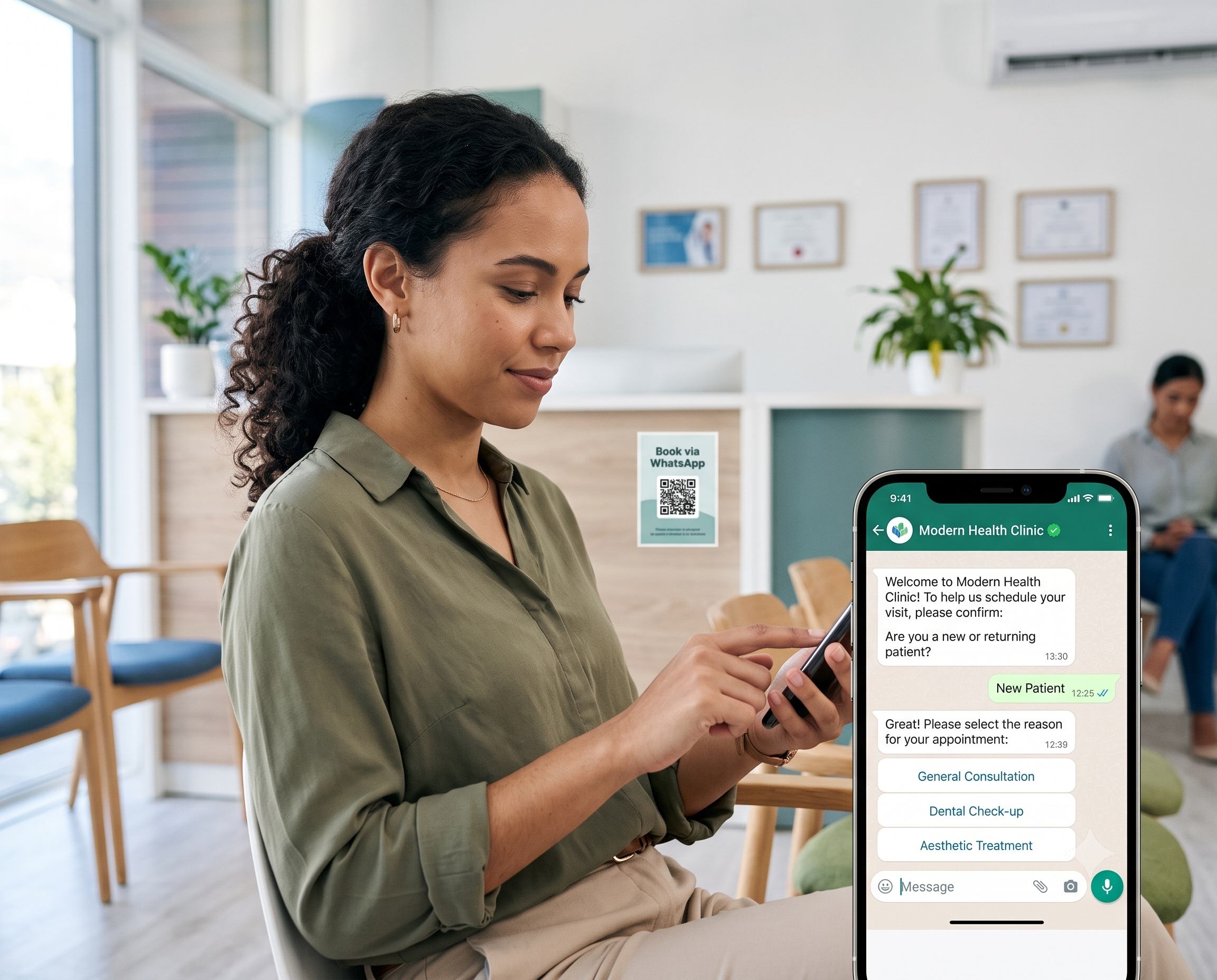
Medical clinics outside the US primary care market lose an average of 25% of appointment slots to no-shows, phone tag, and unanswered messages. In 2026, a growing share of the fix is happening on WhatsApp — the channel where patients in Turkey, LATAM, MENA, the EU, and much of Asia already message businesses first.
Most clinic managers know they should be on WhatsApp. What they don't know is how to get there without creating a compliance mess, without the bot pretending to be a doctor, and without spending three months on integration.
This guide walks through exactly how private clinics, aesthetic practices, dental offices, and cash-pay medical practices deploy a working WhatsApp chatbot in 2026 — from Business API onboarding through patient intake flows, Google Calendar sync, and the four medical-specific safety boundaries that separate a professional deployment from a lawsuit waiting to happen.
By the end, you'll know what to build, what to avoid, and what a real 90-day rollout looks like.
Who this guide is for
This guide is written for clinics where:
- Patients pay cash, insurance-out-of-network, or private insurance (not US Medicare/Medicaid)
- The clinic doesn't sign HIPAA Business Associate Agreements as a matter of workflow
- WhatsApp is the primary or secondary patient contact channel
- The clinic has one to ten providers and books appointments (not walk-in only)
This includes aesthetic clinics, dermatology practices, dental offices, ophthalmology practices, private medical clinics in the EU/UK/CH, and healthcare SMBs across LATAM, MENA, Turkey, and Asia.
If you're a US primary care practice handling PHI under HIPAA, this guide is not for you — you need a HIPAA-BAA-signed platform like Klara. Come back for this after you've moved to cash-pay dermatology.
Why WhatsApp is the real patient channel outside the US
Three shifts made 2026 the year clinic managers actually deploy WhatsApp bots instead of talking about them.
Patients moved off the phone. A 2025 healthcare survey across Turkey, Spain, Mexico, and the UAE found 68% of appointment inquiries now start as a WhatsApp message. The clinics still routing everything through a landline are losing bookings to the practice two doors down that answers in WhatsApp in under two minutes.
WhatsApp Business API is fast now. Getting API access used to take a week of paperwork through Twilio or another intermediary. In 2026, connecting through a Meta Business Partner takes about 5 minutes of technical setup, plus 24 to 48 hours for Meta's business verification and message template approval. That's it.
AI got good enough for medical FAQ. Two years ago, an AI chatbot answering "what does a filler procedure cost?" would confidently invent a number 20% of the time. In 2026, RAG-based systems trained on your real service list and price sheet hit 91 to 95% accuracy on procedure and pricing questions.
The combination means a single-location aesthetic clinic can now run a 24/7 appointment and inquiry system on WhatsApp with less setup effort than installing a new dental chair.
What a WhatsApp chatbot actually does for a clinic
A modern medical clinic chatbot handles seven concrete tasks:
- Appointment booking — patient name, phone, procedure or consultation type, preferred date and time, insurance status, sent into Google Calendar or Calendly
- Procedure and pricing questions — trained on your service list PDF, answers "what does laser hair removal cost?" and "how long is a botox consultation?" with the real numbers
- Patient intake — basic pre-visit questionnaire (contraindications, current medications, allergies) delivered to your team ahead of the appointment
- Appointment reminders — handled by the calendar system itself (Google Calendar email reminders, Calendly's SMS/WhatsApp reminders where enabled), triggered by the bot's booking
- FAQ handling — clinic hours, location and parking, insurance accepted, cancellation policy, follow-up care
- Human handoff — for medical questions, complaints, or complex cases, the bot escalates to your team inside the same WhatsApp chat
- Multilingual support — auto-detects the patient's language and responds in the same language, critical for medical tourism markets and immigrant populations
What it does NOT do — and this is the medical-specific part:
- Diagnose anything, ever
- Recommend medications or dosages
- Interpret symptoms ("does this sound like an infection?")
- Give post-procedure medical advice without a doctor in the loop
These aren't optional restrictions. Cross these lines and you're one aggrieved patient away from a complaint to your medical licensing board.
The four medical-specific safety boundaries
Before you configure anything, decide how the bot handles these four categories. This is the difference between a professional deployment and a liability.
Boundary 1: The "not a doctor" line. Configure a hard rule: if the message contains symptom descriptions, medication questions, or requests for medical advice, the bot responds with a single sentence — "I can help you schedule an appointment, but for medical questions please speak with the doctor" — and alerts a human team member. No exceptions. No "let me try to help first." No trying to sound knowledgeable.
Boundary 2: Emergency escalation. If a patient's message contains keywords suggesting an emergency (severe pain, bleeding, allergic reaction, difficulty breathing), the bot should stop the normal flow and send an urgent instruction: "This sounds urgent. Please call [emergency number] or go to the nearest emergency room immediately." Then alert your team. Do not try to book an appointment for an emergency.
Boundary 3: Data privacy. Every message on WhatsApp Business API is stored by Meta and passes through your chatbot vendor's infrastructure. Under GDPR (and equivalent laws in Turkey, Brazil, Mexico), patients need to consent to this. A first-message disclaimer works: "By continuing this chat, you agree that we may store your messages to help schedule your appointment. Full policy: [link]." Never let the bot ask for detailed medical history via WhatsApp for anything beyond basic pre-visit intake.
Boundary 4: Human handoff. Configure a clear trigger word — "human," "doctor," "manager" — that puts the bot into passive mode and alerts your team. Also configure automatic handoff for repeat questions the bot can't answer, complaints, and any message containing frustration signals (all caps, multiple exclamation marks, "this is ridiculous"). The bot should not try to be a therapist.
If a vendor's platform doesn't let you configure all four of these clearly, walk away. This is the minimum bar for medical.
The 5-step setup process
Here's the exact sequence most clinics follow to launch a working WhatsApp chatbot in one afternoon of technical setup, plus 24-48 hours of Meta verification.
Step 1: Get WhatsApp Business API access through a Meta Business Partner
The regular WhatsApp Business app won't work — it's built for one person replying manually from a phone. You need Business API access, which requires a Meta Business Partner to onboard you.
What you need:
- A verified Facebook Business Manager account
- A dedicated phone number (not tied to your personal WhatsApp)
- Clinic business registration documents
- 24-48 hours for Meta's verification
What to expect:
- Message template approval takes 24-48 hours per template
- The green verified badge is optional and takes 2-4 weeks
- Meta charges per conversation, not per message ($0.005-$0.08 depending on country and type)
Meta Business Partners like Ainisa handle this onboarding as part of their platform. You don't submit anything to Meta directly.
Step 2: Train the AI on your service list and pricing
Upload your service list as a PDF. The chatbot's RAG system indexes it into vector embeddings so the AI can retrieve exact answers at conversation time.
Do this well:
- Use a clean, structured service list PDF — not a design-heavy brochure
- Include procedure names, durations, indicative pricing (or "starting from" ranges), and typical consultation flow
- If you have multiple provider tiers (junior dermatologist vs. senior consultant), upload each pricing tier separately
- For multilingual clinics, upload one version per language
Common mistakes:
- Uploading only marketing brochures with vague "pricing on consultation" copy (the bot will refuse to answer pricing questions, killing conversion)
- Skipping contraindication and preparation information (patients will ask, and the bot needs a real answer, not "check with the doctor")
- Not updating when your service list changes (a 3-month-old price sheet produces wrong quotes)
A good chatbot platform will show you a confidence score after training. Aim for 90%+ before going live.
Step 3: Connect Google Calendar or Calendly
This is where medical clinics either get real automation or get a fancy FAQ bot. Skip this and the bot can't actually book anything.
Simplest working setup:
- Each provider's schedule lives in Google Calendar (or Calendly)
- Chatbot syncs with the calendar in real-time via native integration
- When a patient confirms a slot, the calendar locks it immediately
- Appointment reminders come from the calendar itself (Google Calendar email reminders, Calendly's SMS/WhatsApp reminders where enabled)
Booking fields to capture, in this order:
- Type of appointment (consultation, follow-up, specific procedure)
- Preferred date
- Preferred time slot
- Patient name
- Phone number (auto-filled from WhatsApp)
- Insurance status (self-pay, private insurance, other)
- Brief reason for visit (optional, one line)
Don't ask for full medical history at this stage. It's not necessary for booking and creates data privacy complications.
When to add more integration:
- 50+ appointments/day → connect a dedicated PMS if you have one
- Multi-location → central calendar per location with routing logic
- Complex procedure prep → link to a pre-visit questionnaire tool (Typeform, Jotform)
Step 4: Configure the intake flow — but only what's necessary
Pre-visit intake reduces check-in time by 10-15 minutes per patient. But it's also where medical clinics create the most privacy risk.
Safe intake fields:
- Reason for visit (already collected at booking)
- Insurance card details (for out-of-network billing prep)
- Current medications (short list, no dosages)
- Known allergies (short list)
- Preferred contact method for follow-up
Fields to NEVER collect via WhatsApp intake:
- Detailed medical history (Do it in-person or via secure portal)
- Test results or diagnoses (encrypted portal only)
- Photos of body areas for evaluation (creates PHI liability, even outside HIPAA)
- Payment card details (use a separate payment link, never chat)
Timing matters. Send the intake link 24 hours before the appointment, not immediately after booking. Patients fill it out closer to the visit when it's actually relevant, response rates are 3x higher.
Step 5: Test in every language you serve, then go live
Biggest launch mistake: testing only in one language.
Test scenarios that catch real bugs:
- Procedure question in every language you support ("what's included in a facial cleaning?")
- Booking in each language with an international phone format
- A patient switching language mid-conversation
- A medical question the bot should refuse to answer ("does this sound like an infection?")
- An emergency-signal message ("my child has been bleeding for an hour")
- A vague message like "hi" (does the bot open warmly, not robotically?)
- A complaint ("this is ridiculous, I've been waiting an hour")
For medical tourism markets, test the top 4-5 patient languages. In Istanbul that means Turkish, English, Russian, Arabic. In Barcelona: Spanish, English, French, German. In Dubai: Arabic, English, Russian, Hindi.
Once your language tests pass, publish the WhatsApp number on your Google Business Profile, Instagram bio, website header, and printed materials at reception. Most inbound traffic will come from those five surfaces.
Realistic cost breakdown for a clinic with 800 conversations/month
Clinics overspend on chatbot platforms and underspend on WhatsApp conversation fees. Here's what a typical single-location aesthetic clinic actually pays in 2026:
| Item | Monthly |
|---|---|
| Chatbot platform (Ainisa Pro annual or equivalent) | $25 |
| Meta WhatsApp conversation fees (800 service conversations @ ~$0.02) | $16 |
| BYOK: your own OpenAI or Anthropic key for 800 conversations | $12 |
| Google Calendar (included in Google Workspace you already have) | $0 |
| Realistic total monthly cost | ~$53 |
At 800 conversations, you're paying $53/month all-in with a BYOK platform. Platforms that mark up AI usage (Chatfuel, Tidio, Chatbase) will run $120-180/month for the same volume.
Break-even math:
- One saved no-show for a $200 procedure = covers the whole month
- One captured after-hours booking per week = doubles the ROI
- One recovered lost patient (who would have gone to a competitor) = pays for the year
Most clinics recoup setup costs in the first two weeks.
Real example: an eye clinic in Istanbul over 90 days
An established two-location eye clinic in Istanbul deployed a WhatsApp chatbot in early 2026. The setup covered pre-op and post-op FAQ (LASIK, cataract), consultation booking, insurance and pricing questions, and multilingual support in Turkish, English, Russian, and Arabic. Here's what changed in 90 days:
- Consultation bookings captured via WhatsApp grew from 0 to 41% of total bookings
- No-shows fell from 17% to 6% with automated calendar reminders (Google Calendar handled the sending, the bot handled getting bookings there)
- After-hours bookings (22:00-08:00) went from 2 per week to 34 per week
- Time saved by the front desk team answering repeat questions: about 18 hours per week
- Multilingual bookings (Russian, English, Arabic patients from medical tourism inbound) reached 28% of all bookings
- Escalation to human staff correctly triggered on 100% of tested medical-question scenarios (bot never attempted diagnosis)
Total monthly cost stayed under $60 including Meta fees. The bot paid for itself in the first 12 days.
5 common mistakes that kill medical chatbot deployments
Clinics that don't get value from their chatbot almost always fall into one of these traps.
1. Trying to make it act like a doctor. The biggest and most dangerous mistake. Clinics see other verticals using AI aggressively and think "our patients want quick medical answers." No — your patients want to see a doctor. The bot's job is to make that easier, not to be a doctor.
2. Skipping the emergency-signal configuration. If your bot doesn't know how to recognize and escalate emergencies, you're taking on real risk. This is the first thing to configure, not the last.
3. Collecting too much data too early. Every field you add to intake is a data privacy risk. Ask what you actually need for the visit. Anything else waits for the in-person consultation.
4. Ignoring the multilingual angle. For clinics in medical tourism markets or serving immigrant populations, patients you serve in a language they're uncomfortable with often don't return. Even basic 4-language support pays for itself in retention.
5. Forgetting to update the service list. A chatbot trained on last quarter's price sheet will confidently quote wrong prices. That's a patient complaint waiting to happen. Retrain monthly, or whenever prices change.
What to look for in a medical clinic chatbot platform
Not all chatbot platforms are built for medical. When evaluating, verify:
- Native WhatsApp Business API through a Meta Business Partner, not a Zapier bridge
- Configurable safety boundaries — the four categories above, each configurable at the flow level
- Google Calendar or Calendly native integration — not through Zapier, which introduces delays and reliability issues
- Multilingual support for at least 6 languages natively
- BYOK (Bring Your Own Key) so you're not paying AI markup at high volume
- GDPR-ready data handling with EU or UK data residency options
- Human handoff inside the same WhatsApp chat, not a separate dashboard
- Free trial or live demo you can actually chat with — not just a sales call
- Explicit disclosure about HIPAA-BAA status. If a vendor is vague about compliance, that's a warning sign
Frequently asked questions
Do I need a separate phone number for the WhatsApp chatbot?
Yes. The number connected to WhatsApp Business API can't be used with the regular WhatsApp or WhatsApp Business App simultaneously. Most clinics dedicate a new number or a virtual number to the API and publish it on their booking materials, Google Business Profile, and website.
Is a WhatsApp chatbot GDPR-compliant?
It can be, but not automatically. Under GDPR (and equivalent laws), you need explicit patient consent for message storage, a data processing agreement with your chatbot vendor, and clear disclosure in your privacy policy. Ainisa is GDPR-ready and provides the necessary documentation. Never assume compliance — verify with your vendor.
Can the chatbot handle post-op questions from patients?
Only within tight limits. For general post-op FAQ ("when can I shower after treatment?"), yes, if the answers come from a doctor-approved knowledge base. For any question containing symptom descriptions or worry ("my incision looks red"), the bot should immediately hand off to your team. Never let the AI evaluate post-op symptoms.
What happens if a patient asks the bot about their symptoms?
The bot should never attempt diagnosis or symptom evaluation. Configure a hard rule: any message with symptom descriptions triggers the response "I can help you schedule an appointment, but for medical questions please speak with the doctor" and alerts your team. Test this scenario before going live.
Do medical chatbots reduce no-show rates?
Indirectly, yes — but the reminders themselves come from your calendar system, not the chatbot. When the bot books an appointment into Google Calendar or Calendly, those platforms send email and (with Calendly) SMS/WhatsApp reminders. Two-tier reminders (24h + 2h before appointment) reduce no-shows from roughly 15-25% down to 5-8%. The bot's job is to make sure the booking lands in the right calendar; the calendar handles the reminders.
Can the chatbot process payments for consultations or deposits?
Not natively in most countries yet. WhatsApp Pay is expanding through 2026 but coverage is uneven. For now, clinics requiring deposits send a payment link (Stripe, PayPal) inside the chat — the patient completes payment in a browser tab and the bot confirms the appointment. Never ask for card details in chat.
How do I handle emergencies through a WhatsApp chatbot?
Configure emergency-signal detection: if the patient's message contains keywords like "severe pain," "bleeding," "allergic reaction," or "difficulty breathing," the bot immediately responds with the emergency room instruction and alerts your team. Never let the bot try to schedule an appointment for an urgent situation. Test emergency scenarios before launch.
What if a patient wants to speak to a doctor directly?
Every medical chatbot should have a clear human handoff trigger — usually "doctor," "human," or "help." When triggered, the bot notifies your team and pauses AI replies until a human responds. The handoff should happen inside the same WhatsApp chat, not a separate dashboard.
How much AI training data does a clinic chatbot need?
For a private clinic, your service list PDF plus 30-50 sample Q&A pairs (procedures, prep instructions, aftercare, insurance) is enough. Contraindication and preparation information should be written explicitly — don't assume the AI will figure it out. Total setup time for training: 3-5 hours.
Should the chatbot proactively message patients?
Only with clear opt-in. Meta's WhatsApp policies are strict about unsolicited messages. Appointment reminders sent through Calendly or Google Calendar are allowed (service messages). Marketing broadcasts (promotions, new services) require explicit opt-in from the patient and use Meta's marketing conversation pricing.
How long does it take to launch a clinic WhatsApp chatbot?
Technical setup on a modern platform can be as short as an afternoon: 5 minutes for WhatsApp Business API setup on Ainisa, 24-48 hours for Meta's business verification, 3-5 hours for AI training on your service list, 2-3 hours for testing across languages and safety scenarios. Clinics with EHR integration needs typically take 2-4 weeks including EHR configuration.
See it before you decide
Reading a guide only gets you so far. Chatting with a live agent tells you in 60 seconds whether it fits your clinic.
Ainisa's Medical Clinic AI Agent is live right now — book a fake appointment, ask about procedures, test the intake flow, ask a medical question to see how it declines, switch languages mid-conversation. Every booking lands in a Google Sheet you can open directly to see what your team would receive.
8 languages · Google Calendar + Calendly sync · Meta Business Partner · GDPR ready · No credit card for trial
Ainisa also powers AI agents for adjacent verticals:
- 🦷 Dental Clinics — appointments, procedure Q&A, patient intake
- 💇 Beauty Salons & SPAs — bookings, service menu, price lists
- 🍽️ Restaurants — reservations, menu Q&A, food orders
- 🎓 Education Centers & Academies — enrollment, course info, student support
- 💼 Consulting & Professional Services — lead qualification, discovery calls, client onboarding